✦ A world of the Galaxie PopMyPad — The race to the Ompyrad has begun

Free tracked shipping on every order · 10% off your first mat with code POPMYFIRST

Custom Desk Pads

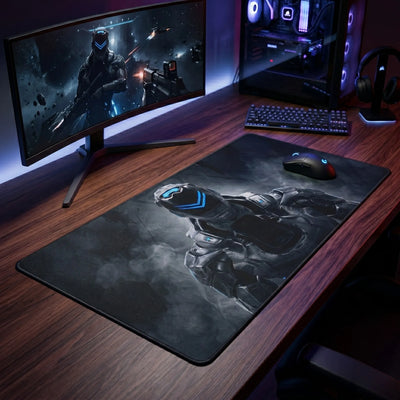
A custom desk pad is the only desk accessory that can carry something of yours: a photograph, a studio logo, an illustration you commissioned, a map of a place you care about. Everything else on a desk is a product....

A custom desk pad is the only desk accessory that can carry something of yours: a photograph, a studio logo, an illustration you commissioned, a map of a place you care about. Everything else on a desk is a product. This one is a print.

How the printing works. Your file is printed into the fibre of the fabric, not laid on top of it as a film. That distinction matters over time: a surface film scuffs where the mouse travels and eventually shows a pale track. Dye in the fibre does not — the image wears at the same rate as the cloth around it.

What to send us. A JPG or PNG at the largest size you have, with no compression applied twice. As a rule of thumb, a file that looks sharp on a 4K screen at full width will print well at 24 inches, and will start to soften past 40. If your file is smaller than that, choose a smaller format rather than stretching it — an upscaled image looks worse at 47 inches than a well-chosen photo does at 20.

Colour. Screens show more saturated colour than any printed textile can reach, particularly in bright reds and electric blues. We convert your file for print, which pulls the most extreme values back into range. Deep blacks, skin tones, landscapes and line artwork all reproduce faithfully; neon gradients will read one notch softer on cloth than on your monitor.

Three formats. 19.7×39.4 in fits a tenkeyless keyboard and a mouse with margin. 21.7×39.4 in adds depth for a full-size keyboard. 23.6×47.2 in covers a standard desk edge to edge and is the format most people regret not buying.

The perimeter is stitched on all four sides, the backing is non-slip rubber, and the pad ships rolled — never folded — so there is no crease to work out when it arrives. 3 mm thick on the two 39.4 in formats, 2 mm on the 47.2 in.

Frequently asked questions

What file should I send?
A JPG or PNG at the largest size you have, saved once rather than re-compressed. A file that looks sharp at full width on a 4K screen prints well up to about 24 inches and starts to soften past 40.

Will the colours match my screen?
Closely, with one exception: screens display more saturated colour than any printed textile can reach. Bright reds and electric blues come out one notch softer on cloth. Blacks, skin tones, landscapes and line artwork reproduce faithfully.

Will the print wear off where the mouse sits?
No. The image is printed into the fibre rather than laid on the surface as a film, so it wears at the same rate as the cloth around it instead of scuffing into a pale track.

Which size should I pick?
19.7×39.4 in for a tenkeyless keyboard and mouse, 21.7×39.4 in for a full-size keyboard, 23.6×47.2 in to cover a standard desk edge to edge.

See also

View as

Frequently asked questions — Custom Desk Pads

1 design in this collection. Printed to order, free shipping with no minimum.

Which desk mat size should I choose?

Three simple reference points: M (11.8×9.8 in) for a crowded desk or office work, L (17.7×15.7 in) for gaming at medium sensitivity, XXL / desk mat (31.5×11.8 to 35.4×15.7 in) to put keyboard and mouse on the same surface. Below 400 DPI, XXL is the only format that leaves enough travel for a full half-turn without lifting the mouse. The size guide walks you through the three measurements.

How thick should a desk mat be?

2 mm: discreet, very direct glide, ideal if the desk is already perfectly flat. 3–4 mm: the best compromise, cushions the wrist without feeling soft. 5 mm and up: smooths out an uneven desk and reduces fatigue over long sessions.

Do these mats work with optical and laser mice?

Yes. The surface is a micro-textured textile read accurately by optical and laser sensors alike, up to high resolutions. The non-slip natural rubber base keeps the mat from moving during sudden movements.

How do I clean a desk mat?

Soft sponge, lukewarm water, a little soap, then dry flat in the open air. No washing machine and no tumble dryer: heat warps the rubber base. The print is dyed into the fibre, so it does not rub off. The full cleaning guide.

Can I have my own artwork printed?

Yes, through the custom mouse pad range: upload your high-definition image and it is printed on the format of your choice. A dedicated range exists for businesses (logo, brand colours, bulk orders). For a full desk, see the custom desk pads.

What about shipping times and costs?

Shipping is free, with no minimum order. Mats are printed to order: allow a few days of production before dispatch — the exact lead time is shown on each product page.
Compare /3

Loading...