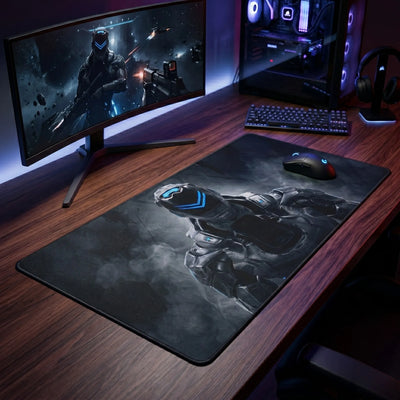
Six to eight hours a day with a hand on a mouse loads the wrist, the forearm and the shoulder. A desk pad is not a medical device and we will not pretend otherwise, but it does change three concrete things: the height your hand rests at, the friction your arm works against, and the temperature of the surface your forearm sits on for a working day.
Height. A pad adds two to four millimetres between hand and desk. That sounds trivial and is not: it is the difference between a wrist resting on a hard edge and a wrist resting on a compliant surface. Paired with a wrist rest that keeps the hand level with the mouse, it keeps forearm, wrist and hand in a straight line — the position that stops being tiring around hour six.
Friction. A cloth or felt surface lets the mouse glide with a light push. A bare desk needs a firmer one, and a firmer push repeated ten thousand times a day is where shoulder fatigue comes from. This is the least visible benefit of a desk pad and the one people notice when they go back to a bare desk.
Temperature. Wood is cold in the morning, glass is cold all day, and both stay that way. Felt and PU leather do not.
Choosing. Felt is the quiet option and the warmest to the touch. PU leather is the wipe-clean option and holds its shape best under a keyboard. Printed cloth is the option that lets the pad look like something rather than nothing.
Every pad in this collection has a non-slip underside, and every product page states its exact sizes and edge finish — stitched on the cloth mats, heat-sealed on the large PU leather pad.
See also
XXL Geometric Gaming Mouse Pad — Blue & Orange Crystal Polygons | PopMyPad
In stockRegular priceFrom $28.47 USDUnit price-
XXL Geometric Gaming Mouse Pad — Magenta & Acid Green Facets | PopMyPad
In stockRegular priceFrom $28.47 USDUnit price-
XXL Keyboard Shortcuts Mouse Pad — Excel & Word Pack | PopMyPad
In stockRegular priceFrom $34.18 USDUnit price-
XXL Geometric Mouse Pad — Black & White Wireframe Stag | PopMyPad
In stockRegular priceFrom $28.47 USDUnit price-
XXL Geometric Gaming Mouse Pad — Cyan Node Network | PopMyPad
In stockRegular priceFrom $28.47 USDUnit price-
XXL Geometric Mouse Pad — Fire & Emerald Hex Polygons | PopMyPad
In stockRegular priceFrom $28.47 USDUnit price-
XXL Geometric Gaming Mouse Pad — Glowing Hexagons | PopMyPad
In stockRegular priceFrom $28.47 USDUnit price-
XXL Geometric Mouse Pad — Abyss & Ember Blocks | PopMyPad
In stockRegular priceFrom $28.47 USDUnit price-
XXL Geometric Mouse Pad — Orange & Black 3D Polygons | PopMyPad
In stockRegular priceFrom $28.47 USDUnit price-
XXL Geometric Mouse Pad — Abyssal Blue Strata | PopMyPad
In stockRegular priceFrom $28.47 USDUnit price-
XXL Geometric Mouse Pad — Orange Shards on Charcoal | PopMyPad
In stockRegular priceFrom $28.47 USDUnit price-
XXL Geometric Mouse Pad — Gold & Turquoise Network | PopMyPad
In stockRegular priceFrom $28.47 USDUnit price-
XXL Geometric Mouse Pad — Cobalt & Matte Black Polygons | PopMyPad
In stockRegular priceFrom $28.47 USDUnit price-
XXL Geometric Mouse Pad — Amber Fusion Polygons | PopMyPad
In stockRegular priceFrom $34.18 USDUnit price-
XXL Geometric Mouse Pad — Dark Hex & Gold | PopMyPad
In stockRegular priceFrom $28.47 USDUnit price-
Office Shortcuts Mouse Pad — Master Office Cheat Sheet | PopMyPad
In stockRegular priceFrom $17.03 USDUnit price-


Frequently asked questions — Office Desk Mats & Wrist Rests
46 designs in this collection. Printed to order, free shipping with no minimum.
Which desk mat size should I choose?
Three simple reference points: M (11.8×9.8 in) for a crowded desk or office work, L (17.7×15.7 in) for gaming at medium sensitivity, XXL / desk mat (31.5×11.8 to 35.4×15.7 in) to put keyboard and mouse on the same surface. Below 400 DPI, XXL is the only format that leaves enough travel for a full half-turn without lifting the mouse. The size guide walks you through the three measurements.
How thick should a desk mat be?
2 mm: discreet, very direct glide, ideal if the desk is already perfectly flat. 3–4 mm: the best compromise, cushions the wrist without feeling soft. 5 mm and up: smooths out an uneven desk and reduces fatigue over long sessions.
Do these mats work with optical and laser mice?
Yes. The surface is a micro-textured textile read accurately by optical and laser sensors alike, up to high resolutions. The non-slip natural rubber base keeps the mat from moving during sudden movements.
How do I clean a desk mat?
Soft sponge, lukewarm water, a little soap, then dry flat in the open air. No washing machine and no tumble dryer: heat warps the rubber base. The print is dyed into the fibre, so it does not rub off. The full cleaning guide.
Can I have my own artwork printed?
Yes, through the custom mouse pad range: upload your high-definition image and it is printed on the format of your choice. A dedicated range exists for businesses (logo, brand colours, bulk orders). For a full desk, see the custom desk pads.
What about shipping times and costs?
Shipping is free, with no minimum order. Mats are printed to order: allow a few days of production before dispatch — the exact lead time is shown on each product page.